
Crypto wallets are supposed to keep your money safe. Lately, they have become one of the easiest ways for scammers to steal it.
Fake wallet apps now look almost identical to real ones. Same logo. Same interface. Same promises. The difference is simple and brutal: the moment you enter your recovery phrase or approve a transaction, your funds are gone. No chargeback. No undo button.
In early 2026, wallet-based scams are one of the fastest-growing crypto fraud methods, driven by polished mobile apps, fake support teams, and AI-generated phishing campaigns. Many victims only realize what happened after their balance hits zero.
In this guide, you’ll learn how fake wallet apps actually work, the exact red flags to watch for, and practical steps to protect your crypto before anything goes wrong.
What Are Fake Wallet Apps?
Fake wallet apps are malicious apps designed to look and behave like legitimate crypto wallets. Their only real job is to trick you into giving up access to your funds.
Some of them copy popular wallets almost perfectly. Same name. Same logo. Same layout. Others pretend to be new wallets offering better security, free rewards, or special features. Once installed, they guide you through a normal-looking setup flow and then quietly steal what matters most: your private keys or recovery phrase.
There are two common ways people end up installing them:
- Imposter apps on app stores
These sneak into Google Play or third-party stores using fake company names and polished screenshots.
- Direct download links
Shared through Telegram groups, Twitter replies, Discord servers, fake support chats, or sponsored ads.
Unlike regular phishing sites that only target you once, fake wallet apps sit on your phone. They can wait days or weeks before draining your funds, which makes them harder to connect to the original mistake.
To make things worse, many of these apps also:
- Show fake balances
- Display fake transaction confirmations
- Block withdrawals with “network error” messages
- Ask for your seed phrase under the excuse of “wallet verification” or “security upgrade”
If an app ever asks for your recovery phrase after setup, it is not protecting you. It is preparing to empty your wallet. Fake wallet apps are just one piece of a much bigger problem, and our detailed breakdown of crypto wallet scams shows how many different ways attackers target users today.
How Fake Wallet Apps Actually Steal Your Crypto?
Fake wallet apps don’t rely on one trick. They use a mix of technical shortcuts and human psychology. Most victims don’t realize what happened until the money is already gone.
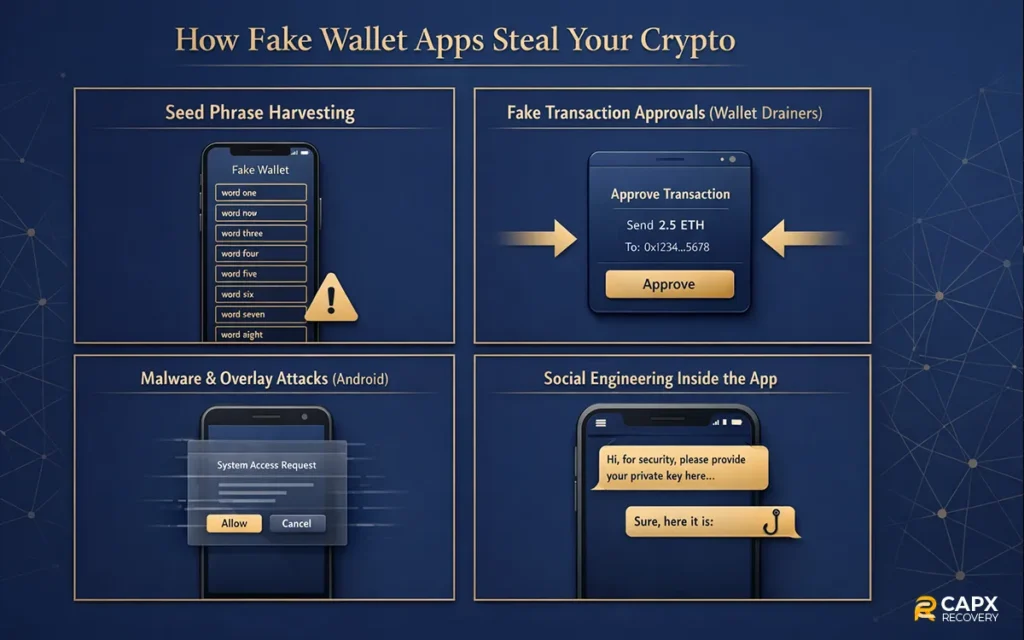
Below are the main methods these apps use.
1. Seed Phrase Harvesting
This is the most common and most deadly method.
The app walks you through a normal setup. Then it shows a screen like:
- Verify your wallet
- Restore the existing wallet
- Security check required
- Backup confirmation needed
You enter your 12 or 24 words.
That’s it.
Those words give full control of your wallet. Scammers import them into their own wallet and move your funds within seconds or hours. You don’t get a warning. Blockchain transactions cannot be reversed.
2. Fake Transaction Approvals (Wallet Drainers)
Some fake wallets don’t ask for your seed phrase at all.
Instead, they:
- Show fake token rewards
- Offer airdrops
- Display “claim” buttons
- Ask you to connect your wallet
When you approve the transaction, you are actually signing permission for the attacker to transfer your assets. These are often called wallet drainers.
To you, it looks like a normal approval screen. In reality, you just authorized a full withdrawal. These tactics are especially common in decentralized apps, and we explain them step by step in our full guide to DeFi wallet scams.
3. Malware and Overlay Attacks (Mostly on Android)
More advanced fake wallets install background malware.
They can:
- Place fake screens on top of real wallet apps
- Capture what you type
- Read clipboard data
- Monitor screenshots
So even if you open a real wallet, the app might show a fake interface and steal your credentials without you noticing.
4. Social Engineering Inside the App
Some apps include fake:
- Live chat support
- Customer service bots
- Security alerts
- Upgrade warnings
These features exist only to pressure you into handing over your seed phrase or approving a transaction “to fix a problem.”
Common Theft Methods at a Glance
| Method | What They Steal | What You See |
| Seed phrase request | Full wallet control | Wallet verification or restore screen |
| Drainer transaction | Token permissions | Claim reward or approve the pop-up |
| Malware overlay | Login + keys | Fake wallet screen |
| Fake support chat | Seed phrase or approvals | Security warning messages |
Red Flags to Spot Fake Wallet Apps Early
Fake wallet apps rely on speed and confusion. The faster you install and trust them, the better it works for the scammer. If you slow down and check a few basics, most of these scams become obvious.
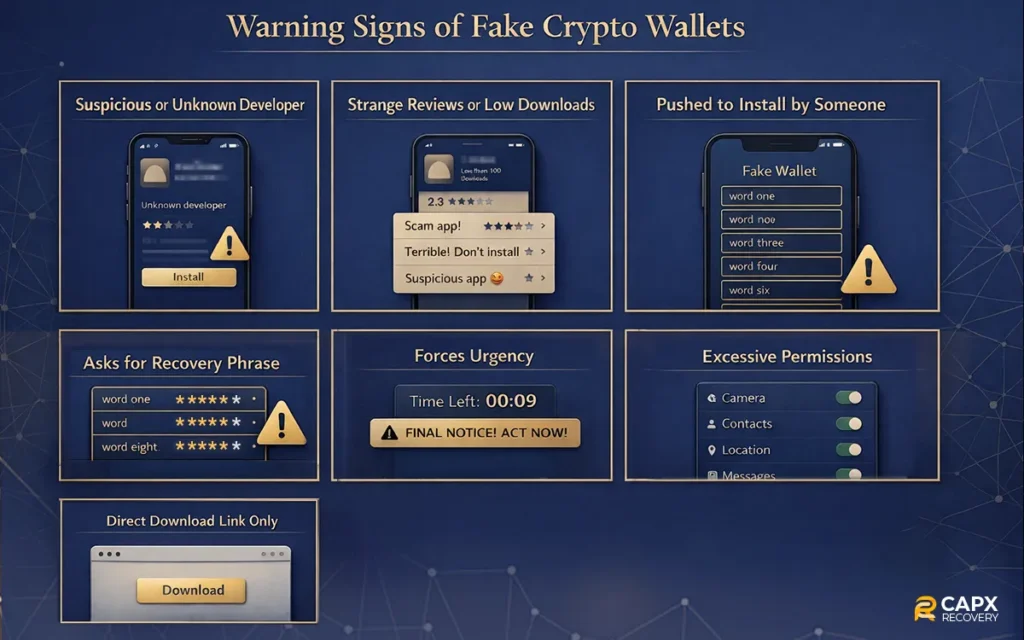
Here are the biggest warning signs.
1. The developer looks suspicious or unknown
Legit wallets are built by companies with:
- An official website
- Public team or company info
- Clear support pages
- Long app history
Fake wallets often use random company names, broken websites, or no online presence at all.
If you cannot easily verify who built the app, do not install it.
2. The app has strange reviews or very few downloads
Watch for:
- Dozens of 5-star reviews were posted on the same day
- Reviews that repeat the same wording
- Complaints about lost funds hidden among fake praise
- Very low download count for a “popular” wallet
Real wallets grow slowly and have years of mixed, natural reviews.
3. You were pushed to install it by someone
This is a huge red flag.
Common sources:
- Telegram or Discord messages
- Twitter replies
- Fake customer support accounts
- YouTube comments
- Sponsored ads promising rewards
Real wallets do not chase users in private messages.
4. It asks for your recovery phrase after setup
This alone is enough to uninstall immediately.
No legitimate wallet will ever ask for:
- Your 12 or 24 words
- Your private key
- A “verification phrase”
- A “migration phrase”
- Any of these means theft.
5. It forces urgency
Scam apps love messages like:
- Account will be frozen
- Security risk detected
- Immediate action required
- Funds may be lost
Urgency shuts down critical thinking. That is the goal.
6. It requests excessive permissions
Be careful if a wallet app asks for:
- Screen recording
- Accessibility access
- Full file storage
- Camera or microphone without a reason
Most wallets only need basic network access.
7. It is only available through a direct download link
If you are told to install an APK file or download from a random site, stop.
Legitimate wallets are distributed through official app stores and their verified websites.
Quick Red Flag Checklist
| Warning Sign | Why It Matters |
| Unknown developer | Hard to verify legitimacy |
| Pushy installation links | Common scam tactic |
| Seed phrase request | Instant wallet takeover |
| Fake urgency alerts | Psychological pressure |
| Excessive permissions | Possible malware |
| Poor or fake reviews | Manufactured trust |
Real Trends and Statistics in 2025–2026
Crypto scams are not a small problem anymore. In 2025, fraudsters stole far more than in previous years, and the tactics are evolving fast.
One of the most cited industry reports estimates that around $17 billion was stolen in crypto scams and fraud in 2025. That’s a dramatic jump driven by impersonation attacks and AI-based scams, with average scam payments climbing sharply compared with 2024.
Across the broader crypto crime landscape, illicit activity also surged. Some analyses found that illicit wallets received more than $150 billion in 2025, a record high compared with prior years, signaling a rebound in criminal activity on-chain.
Even within scams and hacks alone, investors lost billions. Mid-year reports from 2025 showed nearly $2.5 billion stolen in scams and hacks, with wallet compromises making up the largest share.
A few patterns are especially important for readers to know:
- Impersonation and social engineering scams are rising fast. Fake apps and deceptive messages now make up a big portion of scam losses.
- AI tools are helping scammers scale up. Scams that use AI-generated content and deepfakes are more effective and harder to spot.
- Wallet compromises are among the costliest incidents, often tied to weaknesses in how users manage keys or approve transactions.
Here’s a quick snapshot:
| Metric | 2025 Overview |
| Estimated total stolen in scam/fraud | ~$17B |
| Illicit crypto flows received | ~$154B+ |
| Wallet compromise losses (mid-2025) | ~$1.7B |
| AI-assisted scams growth | Significant uplift vs 2024 |
These figures make one thing clear: scams that target wallets are no longer fringe incidents. They are a major category of crypto fraud, and the stakes keep rising as scammers adopt more sophisticated methods.
How to Protect Yourself From Fake Wallet Apps?
You don’t need to be a security expert to stay safe. Most fake wallet scams succeed because of rushed decisions and small mistakes. A few simple habits cut the risk dramatically.
1. Only Download Wallets From Official Sources
Before installing anything:
- Visit the wallet’s official website
- Use the download links from there
- Double-check the developer name in the app store
Avoid links sent through Telegram, Discord, Twitter replies, or email. That’s how most fake wallets spread.
2. Treat Your Recovery Phrase Like Cash
Your seed phrase is your wallet.
Rules that never change:
- Never type it into any website
- Never share it with support staff
- Never store it in screenshots or cloud notes
- Never enter it into a new app unless you are restoring a wallet you personally created
If someone has your phrase, they own your crypto.
3. Use Hardware Wallets for Large Amounts
Mobile wallets are convenient, but not ideal for savings.
For long-term holdings:
- Use a hardware wallet
- Keep it offline when not in use
- Store your recovery phrase on paper or metal, not digitally
This alone blocks most fake app attacks.
4. Check App Permissions Before Approving
A wallet does not need:
- Screen recording
- Accessibility control
- Microphone access
- Full file system access
If you see these requests, uninstall immediately.
5. Slow Down Before Approving Transactions
Many thefts happen at the approval screen.
Before tapping Confirm:
- Read what permissions you are granting
- Watch for “unlimited spending” approvals
- Be suspicious of “free token” or “airdrop” claims
If it feels rushed, stop.
6. Keep Your Device Clean and Updated
- Install system updates
- Use basic antivirus protection
- Avoid cracked apps and APK files
- Don’t jailbreak or root your phone
Malware makes fake wallets far more dangerous.
7. Learn the Common Scam Patterns
If you use DeFi apps, also review:
- Decentralized finance scams
- DeFi wallet scam techniques
Many fake wallet apps are designed to target users who interact with DeFi platforms, which is why understanding common DeFi scams is just as important as choosing the right wallet.
Quick Safety Checklist
| Habit | Why It Helps |
| Install only from official sites | Blocks fake apps |
| Never share the seed phrase | Prevents total wallet takeover |
| Use hardware wallets | Protects large balances |
| Review permissions | Stops spyware |
| Pause before approvals | Avoids drainers |
| Keep OS updated | Reduces malware risk |
What to Do If You’ve Been Scammed by a Fake Wallet App?
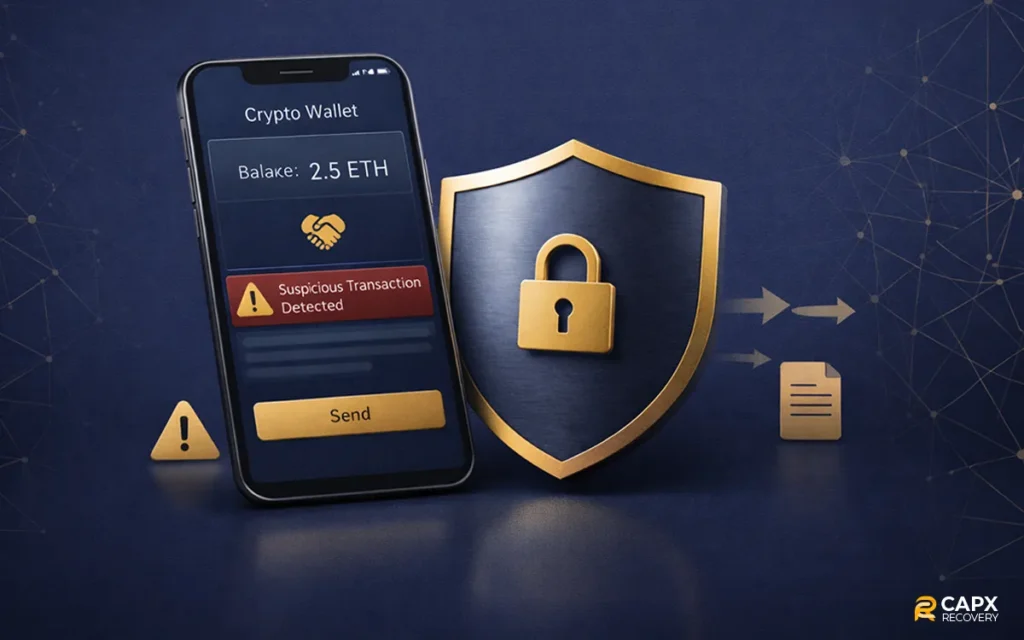
If you realize a fake wallet app has compromised your crypto, act fast. You may not be able to recover everything, but quick steps can limit the damage.
1. Move any Remaining Funds Immediately
If you still have access to the wallet:
- Transfer funds to a new wallet on a clean device
- Use a brand-new recovery phrase
- Do not reuse the old wallet again
Time matters. Scammers often drain wallets in stages.
2. Disconnect compromised apps and permissions
- Uninstall the fake wallet app
- Revoke token approvals using a trusted blockchain explorer or a revoke tool
- Remove suspicious browser extensions
This helps stop further unauthorized transfers.
3. Secure your accounts
Change passwords for:
- Crypto exchanges
- Cloud storage
- Social media
Enable two-factor authentication wherever possible.
4. Document everything
Save:
- Transaction hashes
- Wallet addresses involved
- Screenshots of the app
- Dates and amounts lost
This helps with reports and recovery attempts.
5. Report the scam
You can report to:
- The app store
- Your crypto exchange (if used)
- Local cybercrime authorities
It won’t reverse the transaction, but it helps stop the scam from spreading.
6. Explore professional recovery options
In some cases, blockchain forensic services can:
- Trace stolen funds
- Identify exchange cash-out points
- Assist with legal recovery processes
If your funds are still visible but you can’t move them, this frozen crypto wallet recovery guide explains the steps to take before the situation gets worse.
Stay Ahead of Fake Wallet Scams
Fake wallet apps work because they blend in. They look normal, sound professional, and copy brands people already trust. By the time something feels wrong, the money is often gone.
The good news is that most of these scams follow the same patterns. They rush you. They ask for your recovery phrase. They push strange downloads. They hide behind fake support and urgent warnings.
If you slow down, verify apps before installing, protect your seed phrase, and think twice before approving transactions, you block the majority of attacks.
Crypto gives you full control over your money. That freedom is powerful, but it also means security is your responsibility. Build a few careful habits now, and you avoid learning these lessons the expensive way.
FAQ
Are fake wallet apps found on Google Play and the App Store?
Unfortunately, yes. While app stores remove them regularly, some fake wallets slip through using fake company names, copied branding, and paid reviews. This is why checking the developer, official website, and long-term reviews matters.
Is it safe to restore my wallet in a new app?
Only if:
- The app is verified and well-known
- You downloaded it from the official website or store
- You created that wallet yourself
Never restore a wallet inside an app recommended by a stranger or support account.
Can stolen crypto be recovered?
Usually, no. Blockchain transactions are irreversible. In some cases, if funds move through centralized exchanges, recovery may be possible with fast reporting and legal support. That’s why prevention matters far more than recovery.
What is the safest way to store large amounts of crypto?
Use a hardware wallet.
It keeps your private keys offline, which protects you from:
- Fake wallet apps
- Malware
- Phishing sites
- Browser-based drainers
For daily use, a trusted mobile wallet is fine. For savings, cold storage is much safer.